Wireless deployment
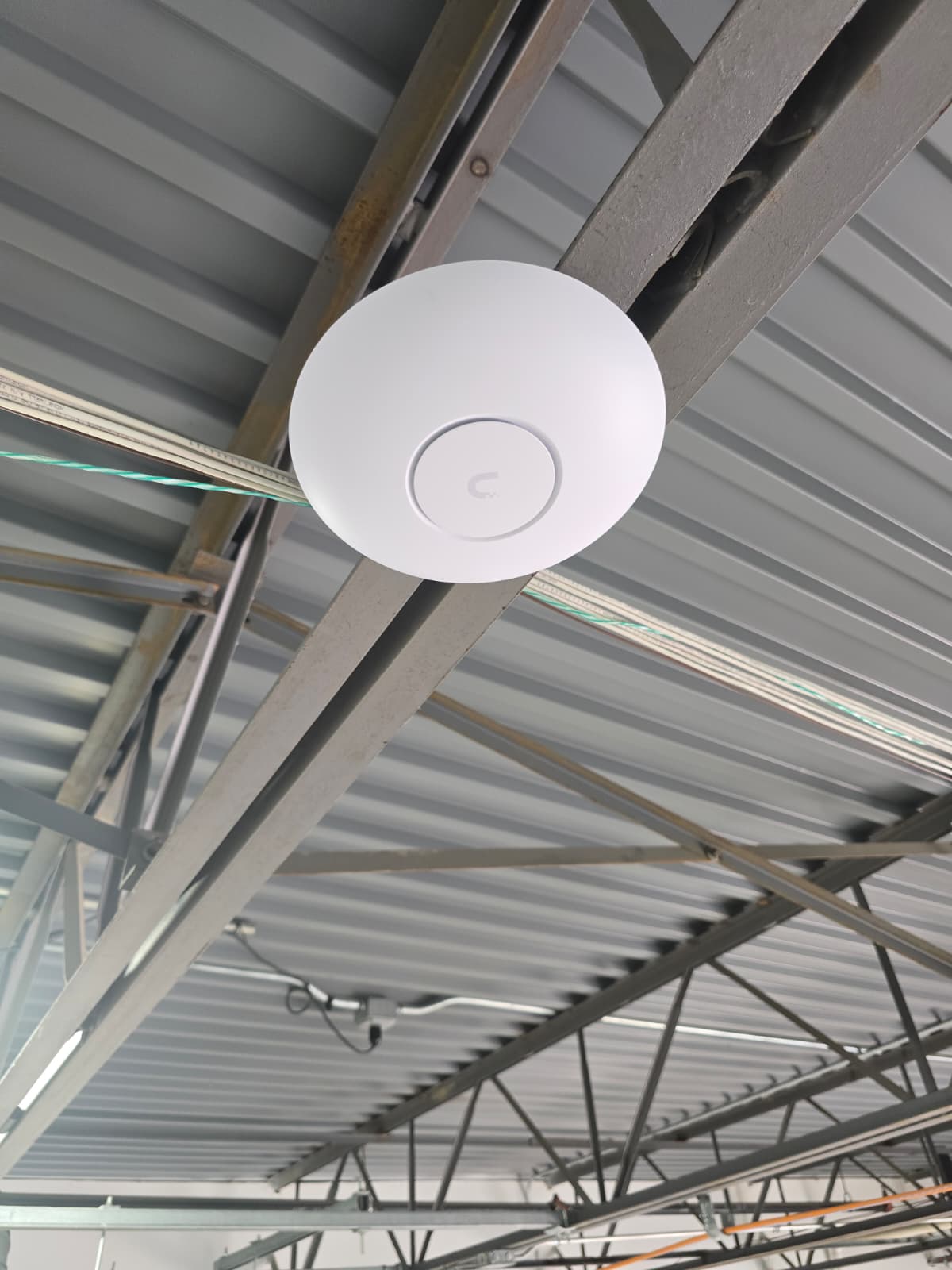
Access point installation, connection, and configuration
This Optimal Technology Group wireless deployment brought together four parts of onsite network work: installing access points, connecting them to the switch, configuring the access points, and testing their speed and coverage. OTG completed the project with work on both the physical equipment and the configuration that accompanied it. Speed and coverage testing formed part of the confirmed scope, giving this account a practical focus beyond the installation photograph.
An access point installation is easier to understand when the equipment, its network connection, and its configuration are described together. A photo shows the installed device, but it cannot show every setting or the experience of a connected user. This project included those less visible activities as well. The following account explains the confirmed work and offers planning context for businesses considering a similar deployment. Planning considerations are general guidance, rather than a claim that every example described here occurred at this site.
The project is presented without a named customer, equipment model, or published performance figures. Its documented scope is access point installation, switch connectivity, access point configuration, and speed and coverage testing. That scope provides a clear starting point for discussing how wireless equipment becomes part of a business network and what information helps define a comparable onsite request.
Installing the wireless access points
OTG installed access points as part of this wireless deployment. These were the wireless devices involved in the confirmed project. Installation is the physical part of making that equipment available at the site, while connection and configuration address how the installed devices participate in the network. Keeping these activities distinct helps a business describe the work it needs without assuming that delivery of a device includes every related task.
For a prospective project, the installation brief should identify the areas where wireless service is required. It can describe rooms, work areas, shared spaces, or other locations where people use connected equipment. Existing photos and a simple description of the layout can help explain the request. Access requirements also matter: a technician may need permission to enter particular areas or coordinate around business activity. These are useful planning details to share before agreeing an installation scope.
The access point count and installation locations for this completed project have not been published. The photograph remains an approved OTG project image, without serving as evidence for a specific product specification or area measurement. Businesses viewing it can see the type of onsite equipment work represented, while the written scope identifies the additional connection, configuration, and testing activities confirmed by OTG.
Connecting the access points to the switch
After installation, OTG connected the access points to the switch. This is an important part of the project account because the wireless devices were connected into the site’s network infrastructure. The work therefore involved a relationship between the installed access points and the equipment handling their network connections. It was more than placing wireless hardware in position.
When requesting comparable work, a business should explain what network equipment is already available and where it is located. The switch location, the intended access point locations, and any existing cable connections help describe the physical scope. If the business is uncertain about its current setup, it can say so rather than supplying a guessed specification. A clear description of what is known is more useful than assuming that every installation requires the same connection arrangement.
The confirmed switch connection in this project does not establish that OTG replaced the switch or installed new structured cabling for these access points. Those would be additional activities requiring their own confirmation. This distinction matters when comparing projects: an installation using available connections can have a different physical scope from a project that also needs new cabling or changes to rack equipment. The actual request should identify which work is needed at the site.
Configuring the installed access points
OTG configured the access points as part of the wireless deployment. Configuration belongs alongside installation in the project description because installed hardware and configured hardware describe different parts of the work. The owner confirmed that configuration took place; the specific settings and management system are not included in this public account.
For a new deployment, the business or its IT team should explain the intended wireless use and who is responsible for approving network settings. That conversation can identify the people who provide the required configuration information and the people who confirm the requested behavior. It also helps separate physical installation responsibilities from decisions that belong to the business’s network administrator. Account credentials and other private access details should be handled through an appropriate agreed process, rather than included in a public inquiry description.
A useful brief can explain whether the access points are part of an existing wireless setup or a separate installation request. It can also identify any equipment information already available to the business. Those details help clarify the work before configuration begins. They do not require the business to know every technical setting; describing the intended use and available IT contacts gives the discussion a practical foundation.
Testing wireless speed
The owner confirmed that OTG tested the access points’ speed. This activity belongs in the completed project scope, alongside installation and configuration. No measured speeds, comparison figures, or test thresholds are published here, so the account does not claim a particular throughput result or a percentage improvement over the previous setup.
Wireless speed testing should be understood in context. Cisco’s Wi-Fi throughput testing guidance describes how the client device and testing environment affect observed throughput. A test result therefore needs context about what was tested and under which conditions. This is general technical background; it does not identify the brand of equipment used by OTG or the method used on this project.
For a business preparing a new request, it is helpful to state what users need to do over the wireless connection. The discussion might concern access to business tools, a particular working area, or an existing connectivity concern. Those needs help define the questions that testing should answer. A headline speed alone may leave the business unsure whether the test reflects the conditions that matter to its users.
A project record can distinguish a measured result from an equipment specification and from a future expectation. Those are different kinds of information. Recording the test conditions and the question being investigated makes a result easier to interpret. In this project, the confirmed fact is that speed testing took place; publication of numerical results would require the actual project measurements.
Checking wireless coverage
OTG also tested coverage. That confirms the project included checking the wireless deployment’s reach, as well as its speed. Coverage testing and speed testing address related but different questions. A business may need to know where a connection is available and how that connection behaves for its intended work. The confirmed project scope included attention to both.
Cisco’s wireless site survey guidance explains the importance of evaluating wireless behavior in the actual environment. That background helps explain why an installed access point photo does not establish coverage throughout a building. The coverage findings for this OTG project have not been published, and this account does not claim that every area achieved a particular signal level.
For a comparable request, a business can list the areas that matter most to users. Describing a work area precisely is more useful than asking for good coverage everywhere without defining the intended space. If an existing problem occurs only in a certain room or at a particular workstation, that detail can help frame the request. The business can also distinguish spaces that are currently used from areas planned for later use.
The important project fact is that OTG performed coverage testing after undertaking the wireless work. This provides a fuller account of the deployment than installation alone. Exact tested locations, findings, or follow-up changes should be added only when supported by the project record, rather than inferred from the fact that testing occurred.
Understanding the complete connection path
The confirmed activities form a connected scope: wireless access points were installed, connected to the switch, configured, and tested. Each activity describes a different part of bringing the equipment into use. Together, they show how this project crossed between physical field work and network configuration.
For a business reader, that relationship is useful when deciding how to describe a similar need. A request to install access points may require access to network equipment and configuration information as well as access to the installation areas. The people responsible for those parts of the site may be different. Identifying them early can make the requested responsibilities clearer, particularly when an internal IT team is coordinating work with onsite support.
This does not mean every wireless request needs the same package of tasks. Some requests may concern only an existing device, while others involve additional installation work. The brief should reflect the actual site and required activities. This completed OTG project illustrates a scope that included physical installation, switch connections, configuration, and testing, without turning that example into a fixed service package or a promise about future results.
Information that makes a wireless request clearer
A useful wireless project inquiry begins with the business need. Explain what is being installed or changed, where people need connectivity, and whether the request concerns new equipment or existing equipment. Include the site location and preferred timing if known. These details give OTG a practical starting point for discussing the work.
Next, describe the available network equipment and any known access constraints. Equipment names or photos can help when they are available, but a business should not feel required to invent technical details. If another IT provider or an internal administrator supplies the configuration, identify that role in the request. This helps explain who can confirm the settings and provide the necessary information during an agreed project.
Finally, describe the questions you want installation checks to answer. A speed concern and a coverage concern may involve different observations. Explain the affected areas or user tasks in plain language. Avoid sending passwords or private network configuration through the website form. The form is a starting point for understanding the request, and the detailed scope can be discussed through the appropriate follow-up process.
How this project fits OTG’s services
This wireless deployment relates directly to OTG’s approved Network & Infrastructure work, which includes wireless access point installation and hands-on network equipment work. The confirmed project shows those activities in a completed installation involving switch connectivity, access point configuration, and testing.
It also connects with IT Field Services, the onsite delivery of equipment installation, upgrades, and other location-based technology work. These service descriptions help prospective customers identify a relevant inquiry category. They do not imply that an unrelated capability, monitoring contract, or ongoing support arrangement was part of this project.
Businesses can use the project as a reference when explaining a similar need, while providing their own site details and intended scope. The appropriate work depends on the equipment and environment involved. An inquiry can mention access point installation, available switch connections, configuration responsibilities, and the required checks, giving OTG enough context to begin reviewing the request.
Wireless deployment recap
OTG’s completed wireless deployment included installing access points, connecting them to the switch, configuring them, and testing speed and coverage. Those are the confirmed activities behind the project photo. They describe practical work at the site without adding unsupported product claims, customer outcomes, or performance numbers.
The project account also highlights a useful distinction for business planning: installation, connection, configuration, and testing all deserve attention in the scope. A business can describe each relevant need in straightforward terms, even when it does not yet know the detailed equipment specifications. That makes the request more concrete and helps keep assumptions out of the discussion.
To discuss a similar project, tell OTG about the wireless work you need. Include the areas involved, the equipment information available, and your target timing. You can also return to Projects to view other completed OTG work, including the separate network rack deployment and workstation rollout.